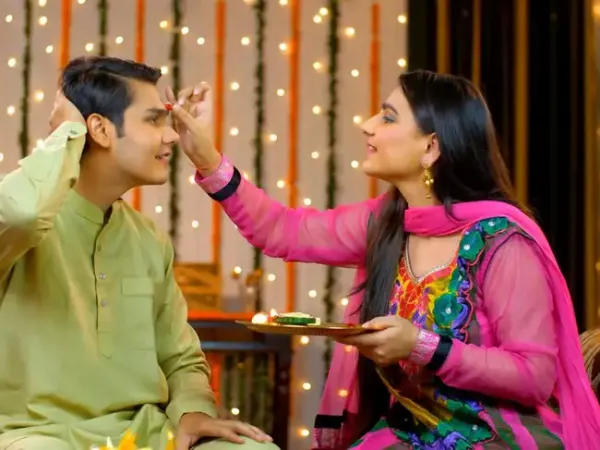
Bhai Dooj 2026 AI Photo Prompts: From traditional sibling portraits to royal festive photoshoots, Here are different prompts to try using ChatGPT and Gemini
Bhai Dooj 2026 is a special occasion to celebrate the beautiful bond between brothers and sisters. As families come together to mark the festival with tilak ceremonies, gifts and heartfelt wishes, many are also turning to AI tools to create personalised festive pictures. From traditional ethnic portraits and adorable sibling moments to royal festive photoshoots, these Bhai Dooj AI photo prompts can help you transform your favourite pictures into stunning, memorable images to share on Instagram, WhatsApp and other social media platforms.
Also Read: Bengaluru-Madgaon Vande Bharat Express to launch soon: Check expected date, timings, route and stops
Prompt: Create a beautiful traditional Bhai Dooj portrait of a brother and sister celebrating together. Dress the sister in a vibrant red silk saree and the brother in an elegant cream kurta. Add a festive background with marigold flowers, diyas, rangoli and traditional decorations. Use warm lighting and professional photography. Keep their original facial features unchanged.
2. Royal Brother-Sister Portrait
Prompt: Transform this sibling photograph into a royal Indian festive photoshoot. Dress the brother in an embroidered sherwani and the sister in a stunning royal lehenga with traditional jewellery. Add a palace-inspired background with golden lighting, elegant decorations and a luxurious festive atmosphere. Preserve their original faces and expressions.
3. Childhood Memories-Themed Portrait
Prompt: Create a heartwarming childhood-inspired Bhai Dooj photograph featuring a brother and sister sitting together and smiling. Dress them in colourful traditional Indian outfits. Add a cosy home background with flowers, sweets and diyas. Give the photograph a nostalgic and dreamy appearance while retaining their original facial identities.
4. Bhai Dooj Tilak Ceremony
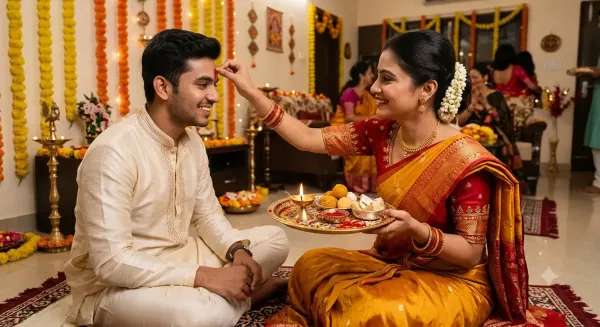
Prompt: Create a realistic festive photograph showing a sister performing the traditional Bhai Dooj tilak ceremony for her brother. Capture her by applying a red tilak to his forehead while holding a beautifully decorated puja thali with sweets, rice and a diya. Include traditional outfits, warm lighting and a beautifully decorated Indian home.
 5. Instagram-Worthy Festive Sibling Portrait
Prompt: Turn this picture into a stylish Bhai Dooj Instagram photoshoot. Dress the siblings in coordinated pastel ethnic outfits. Add a beautiful festive backdrop with fairy lights, flowers and elegant decorations. Capture candid smiles and natural sibling chemistry. Use high-resolution editorial photography, soft golden lighting and realistic facial details.
6. Emotional Brother-Sister Hug
Prompt: Create an emotional and heartwarming Bhai Dooj portrait of a brother and sister sharing a warm hug. Dress them in beautiful traditional Indian outfits. Set the scene in a decorated home with glowing diyas and marigold flowers. Capture genuine happiness, love and sibling affection with cinematic lighting and a soft festive atmosphere.
7. Minimalist Elegant Bhai Dooj Photoshoot
Prompt: Create an elegant minimalist Bhai Dooj sibling portrait. Dress the brother and sister in sophisticated ivory and beige ethnic outfits. Use a simple cream-coloured background decorated with subtle flowers, brass diyas and traditional elements. Capture a graceful pose with natural smiles, soft daylight and premium professional portrait photography.
8. Bollywood-Style Bhai Dooj Photoshoot
Prompt: Transform this sibling photograph into a glamorous Bollywood-style Bhai Dooj photoshoot. Dress the sister in a stunning embellished lehenga and the brother in a stylish traditional sherwani. Add a grand festive setting with glowing lights, flowers and beautiful decorations. Use cinematic lighting, rich colours and a dramatic yet natural composition.
2. Upload Your Photograph: Click on the '+' icon in the message box and select 'Add photos & files'. Choose a clear picture of yourself with your sibling.
3. Enter Your AI Prompt: Copy and paste your preferred Bhai Dooj AI photo prompt. Describe the outfits, background, lighting, poses and festive elements you want in the photograph.
4. Mention Facial Details: Add instructions such as "Keep our original facial features, skin tone and identity unchanged" to help retain your appearance.
5. Generate Your Image: Submit the prompt and let ChatGPT create your personalised Bhai Dooj photograph.
6. Make Changes If Required: If you are not happy with the result, ask ChatGPT to modify the background, clothing, decorations or lighting.
7. Save Your Final Picture: Once you are satisfied with the generated photograph, download it and share it on WhatsApp, Instagram or other social media platforms.
2. Upload Your Photograph: Click on the '+' icon in the prompt box and select the image you want to edit. Choose a clear photograph featuring you and your sibling.
3. Enter Your AI Prompt: Copy and paste your preferred Bhai Dooj AI photo prompt. Describe the festive theme, clothing, background, poses and decorations you want.
4. Add Facial Instructions: Include a line such as "Keep our original facial features, skin tone, expressions and identities unchanged" to help maintain your natural appearance.
5. Generate Your AI Photograph: Submit the prompt and allow Gemini to create your personalised festive image.
6. Edit The Generated Picture: If you want changes, ask Gemini to modify specific details, such as outfits, lighting, background decorations or poses.
7. Download And Share: Once you are happy with the result, download the image and share it with your friends and family on WhatsApp, Instagram and other social media platforms.
1. Choose High-Quality Photographs: Upload clear, well-lit pictures where both siblings' faces are visible. Avoid blurry, dark or heavily filtered photographs.
2. Use Detailed AI Prompts: Clearly describe the festive theme, outfits, background, poses, colours and lighting you want in the final photograph.
3. Preserve Original Facial Features: Include instructions asking the AI tool to retain your original facial features, skin tone, expressions and identity.
4. Experiment With Traditional Outfits: Mention specific clothing choices, such as silk sarees, lehengas, embroidered kurtas and sherwanis, to achieve an authentic festive appearance.
5. Pay Attention To Background Details: Include elements such as rangoli, marigold flowers, diyas, decorative lights and puja thalis to create a festive atmosphere.
6. Avoid Overloading The Prompt: Too many unrelated details can make the generated photograph look cluttered. Keep your instructions clear and focused.
Also Read: Bengaluru-Madgaon Vande Bharat Express to launch soon: Check expected date, timings, route and stops
Bhai Dooj 2026 AI Prompts
1. Traditional Bhai Dooj Sibling PhotoshootPrompt: Create a beautiful traditional Bhai Dooj portrait of a brother and sister celebrating together. Dress the sister in a vibrant red silk saree and the brother in an elegant cream kurta. Add a festive background with marigold flowers, diyas, rangoli and traditional decorations. Use warm lighting and professional photography. Keep their original facial features unchanged.
2. Royal Brother-Sister Portrait
Prompt: Transform this sibling photograph into a royal Indian festive photoshoot. Dress the brother in an embroidered sherwani and the sister in a stunning royal lehenga with traditional jewellery. Add a palace-inspired background with golden lighting, elegant decorations and a luxurious festive atmosphere. Preserve their original faces and expressions.
3. Childhood Memories-Themed Portrait
Prompt: Create a heartwarming childhood-inspired Bhai Dooj photograph featuring a brother and sister sitting together and smiling. Dress them in colourful traditional Indian outfits. Add a cosy home background with flowers, sweets and diyas. Give the photograph a nostalgic and dreamy appearance while retaining their original facial identities.
4. Bhai Dooj Tilak Ceremony
Prompt: Create a realistic festive photograph showing a sister performing the traditional Bhai Dooj tilak ceremony for her brother. Capture her by applying a red tilak to his forehead while holding a beautifully decorated puja thali with sweets, rice and a diya. Include traditional outfits, warm lighting and a beautifully decorated Indian home.
Bhai Dooj Tilak Ceremony
Prompt: Turn this picture into a stylish Bhai Dooj Instagram photoshoot. Dress the siblings in coordinated pastel ethnic outfits. Add a beautiful festive backdrop with fairy lights, flowers and elegant decorations. Capture candid smiles and natural sibling chemistry. Use high-resolution editorial photography, soft golden lighting and realistic facial details.
6. Emotional Brother-Sister Hug
Prompt: Create an emotional and heartwarming Bhai Dooj portrait of a brother and sister sharing a warm hug. Dress them in beautiful traditional Indian outfits. Set the scene in a decorated home with glowing diyas and marigold flowers. Capture genuine happiness, love and sibling affection with cinematic lighting and a soft festive atmosphere.
7. Minimalist Elegant Bhai Dooj Photoshoot
Prompt: Create an elegant minimalist Bhai Dooj sibling portrait. Dress the brother and sister in sophisticated ivory and beige ethnic outfits. Use a simple cream-coloured background decorated with subtle flowers, brass diyas and traditional elements. Capture a graceful pose with natural smiles, soft daylight and premium professional portrait photography.
8. Bollywood-Style Bhai Dooj Photoshoot
Prompt: Transform this sibling photograph into a glamorous Bollywood-style Bhai Dooj photoshoot. Dress the sister in a stunning embellished lehenga and the brother in a stylish traditional sherwani. Add a grand festive setting with glowing lights, flowers and beautiful decorations. Use cinematic lighting, rich colours and a dramatic yet natural composition.
How To Create Bhai Dooj AI Photos Using ChatGPT Or Gemini: Step-By-Step Guide
You can use AI tools such as ChatGPT and Google Gemini to transform your photo into a festive portrait by uploading a picture and entering a detailed prompt.How To Create Bhai Dooj AI Photos Using ChatGPT
1. Open ChatGPT: Visit ChatGPT on your smartphone or desktop and log in to your account.2. Upload Your Photograph: Click on the '+' icon in the message box and select 'Add photos & files'. Choose a clear picture of yourself with your sibling.
3. Enter Your AI Prompt: Copy and paste your preferred Bhai Dooj AI photo prompt. Describe the outfits, background, lighting, poses and festive elements you want in the photograph.
4. Mention Facial Details: Add instructions such as "Keep our original facial features, skin tone and identity unchanged" to help retain your appearance.
5. Generate Your Image: Submit the prompt and let ChatGPT create your personalised Bhai Dooj photograph.
6. Make Changes If Required: If you are not happy with the result, ask ChatGPT to modify the background, clothing, decorations or lighting.
7. Save Your Final Picture: Once you are satisfied with the generated photograph, download it and share it on WhatsApp, Instagram or other social media platforms.
How To Create Bhai Dooj AI Photos Using Gemini
1. Open Google Gemini: Visit Google Gemini on your smartphone or desktop and sign in using your Google account.2. Upload Your Photograph: Click on the '+' icon in the prompt box and select the image you want to edit. Choose a clear photograph featuring you and your sibling.
3. Enter Your AI Prompt: Copy and paste your preferred Bhai Dooj AI photo prompt. Describe the festive theme, clothing, background, poses and decorations you want.
4. Add Facial Instructions: Include a line such as "Keep our original facial features, skin tone, expressions and identities unchanged" to help maintain your natural appearance.
5. Generate Your AI Photograph: Submit the prompt and allow Gemini to create your personalised festive image.
6. Edit The Generated Picture: If you want changes, ask Gemini to modify specific details, such as outfits, lighting, background decorations or poses.
7. Download And Share: Once you are happy with the result, download the image and share it with your friends and family on WhatsApp, Instagram and other social media platforms.
Things To Keep In Mind For Better Bhai Dooj AI Photos
Creating beautiful Bhai Dooj AI photographs requires more than just uploading a picture. A few simple tips can help you get realistic, detailed and visually appealing results using ChatGPT or Google Gemini.1. Choose High-Quality Photographs: Upload clear, well-lit pictures where both siblings' faces are visible. Avoid blurry, dark or heavily filtered photographs.
2. Use Detailed AI Prompts: Clearly describe the festive theme, outfits, background, poses, colours and lighting you want in the final photograph.
3. Preserve Original Facial Features: Include instructions asking the AI tool to retain your original facial features, skin tone, expressions and identity.
4. Experiment With Traditional Outfits: Mention specific clothing choices, such as silk sarees, lehengas, embroidered kurtas and sherwanis, to achieve an authentic festive appearance.
5. Pay Attention To Background Details: Include elements such as rangoli, marigold flowers, diyas, decorative lights and puja thalis to create a festive atmosphere.
6. Avoid Overloading The Prompt: Too many unrelated details can make the generated photograph look cluttered. Keep your instructions clear and focused.